
The 8-Byte skew: Reconstructing Kindle framebuffers over SSH
Read time: 6 min
Tags: koreader reverse-engineering kindle ffmpeg
A minor tooling itch often leads straight down an architecture rabbit hole.
While writing the readme of my most recent project, a plugin for KOReader, I ran into a simple ergonomic barrier: capturing a screenshot while an input modal or on-screen keyboard is open.
I like to read research papers from arXiv on my Kindle, a jailbroken Kindle Basic 7th Gen (2014 touchscreen, FW 5.12.2.2), because the two-column layout pairs well with KOReader’s focus mode, providing a distraction-free reading experience.
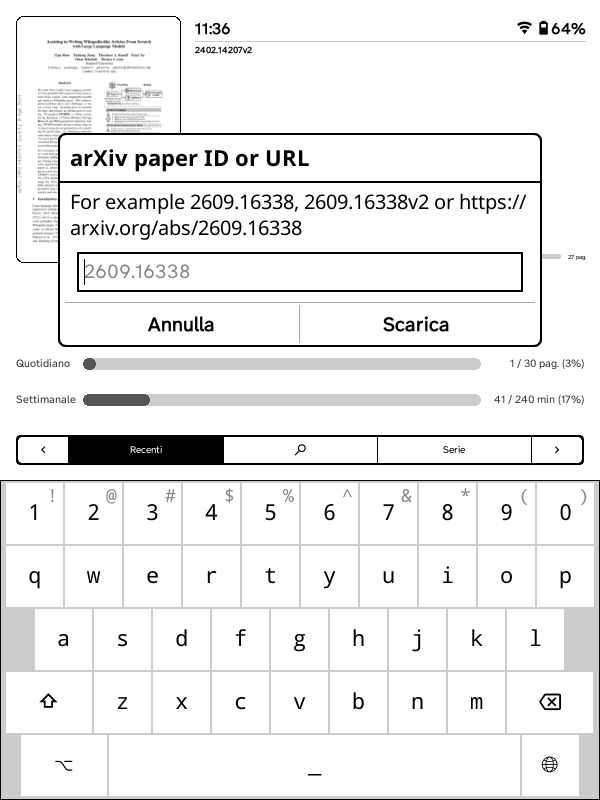
To streamline this workflow, I wrote arxiv.koplugin, a KOReader plugin that lets you download PDFs from arXiv directly to your e-reader for offline reading, and the screenshot I needed to capture was this one.
How you (usually) take a screenshot
On most Kindle models running KOReader, a simple two-corner diagonal tap triggers the built-in screenshot routine, which saves a PNG directly to the device’s storage. This works seamlessly when the display is idle: a quick tap at the bezel corners captures the current framebuffer state without any UI interference.
The process is straightforward: touch the opposite corners simultaneously, KOReader intercepts the gesture at the system event level, and the image lands in the screenshots folder moments later.
The issue
In KOReader, custom tap zones and gestural triggers are hooked to reader-view events. The moment an InputDialog appears, it takes over the event loop-eating touch coordinates to map keypresses or dismissing the dialog entirely. The built-in two-corner diagonal tap can bypass this at the system event level, but the infrared zForce grid on the Basic 7 is finicky when trying to hit two simultaneous millimeter-precise corner coordinates right along the bezel.
The pragmatic engineer’s fix? Open a shell, bypass the UI stack entirely, and read the framebuffer directly from /dev/fb0.
Except streaming raw display memory to a modern decoder doesn’t always yield what you expect. If you ignore memory stride, what you get is pure abstract digital art: a sheared, skewed, repeating barcode of diagonal scanlines.
Here is the breakdown of why that happens, the memory alignment math behind it, and how to reconstruct an exact pixel-perfect capture.
The Naive Dump
Under Linux, /dev/fb0 exposes the video display memory as a flat, contiguous sequence of bytes. Since the Kindle Basic 7th Gen features a 600×800 E-ink panel running in 8-bit grayscale ($1\text{ byte per pixel}$), piping the raw video stream into ffmpeg over SSH seems trivial:
ssh root@<kindle-ip> -p 2222 "cat /dev/fb0" | \
  ffmpeg -f rawvideo -pixel_format gray -video_size 600x800 \
  -i - -vframes 1 -y capture.png
Run this, open capture.png, and the result is catastrophic:
[image2 @ 0x...] Cannot write more than one file...
Then, after capping frames with -vframes 1, the output resembled a damaged analog broadcast: a cascade of scanlines placed diagonally across the frame, text columns tilt at sharp angles, and pixels wrap horizontally in a repeating barcode pattern.
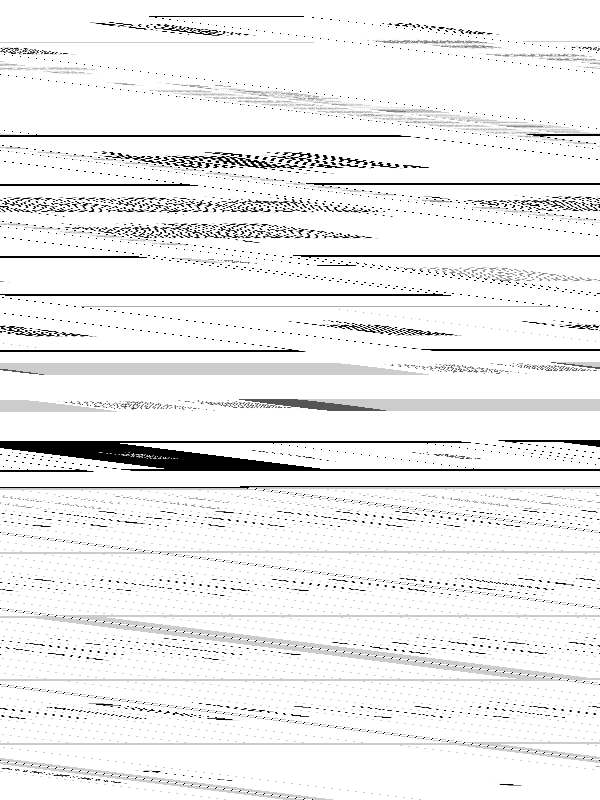
Why? Because human raster logic assumes display RAM is tightly packed. Hardware DMA engines assume nothing of that.
Interrogating the Kernel via fbset
Whenever a raw frame distorts, the decoder’s stride assumption is mismatched with the kernel’s actual hardware scanout configuration.
Querying the framebuffer device via SSH reveals the underlying geometry:
ssh root@<kindle-ip> -p 2222 "fbset"
The output gives up the culprit immediately:
mode "600x800-0"
    # D: 0.037 MHz, H: 0.052 kHz, V: 0.064 Hz
    geometry 600 800 608 5376 8
    timings 27027027 8 100 4 8 4 1
    accel false
    rgba 8/0,8/0,8/0,0/0
endmode
Let’s dissect what that geometry tuple actually defines:
geometry <xres> <yres> <vxres> <vyres> <bpp>
geometry  600    800    608    5376     8
-
600 800(Visible Resolution): The physical panel bounds. The Electronic Paper Display Controller (EPDC) paints exactly $600 \times 800$ physical microcapsules. -
8(Bits Per Pixel): Grayscale depth. Every pixel is an 8-bit byte representing luminance ($0 = \text{black}$, $255 = \text{white}$). Because $\text{bpp} = 8$, horizontal pixel count maps 1:1 to memory byte count. -
608(Virtual Line Width / Pitch / Stride): The hardware row pitch. The display controller allocates 608 bytes in RAM for every single horizontal scanline, not 600. -
5376(Virtual Height): Internal ring buffer allocation in kernel memory, used by the E-ink driver to process multi-frame waveform transitions and partial flashing.
Why the 8-Byte Stride Exists
Why would the kernel allocate 608 bytes for a 600-pixel screen?
The SoC running this Kindle (an NXP/Freescale i.MX series) routes display updates via Direct Memory Access (DMA) bursts. DMA engines and memory buses do not like arbitrary byte boundaries; they thrive on 32-byte or 64-bit alignment to maximize burst transaction throughput on the bus:
\[\frac{600\text{ bytes}}{32\text{ bytes/burst}} = 18.75 \quad (\text{unaligned})\]To prevent inefficient partial-bus transactions on every row boundary, the driver rounds the pitch up to the nearest 32-byte multiple:
\[\left\lceil \frac{600}{32} \right\rceil \times 32 = 19 \times 32 = 608\text{ bytes}\]The real memory layout inside the kernel is:
\[\underbrace{[\text{Pixel } 0 \dots 599]}_{\text{600 bytes visible}} \parallel \underbrace{[\text{Pad } 0 \dots 7]}_{\text{8 slack bytes}}\]The active display receives the first 600 bytes; the trailing 8 bytes are discarded padding.
The Geometry of the Shear
Because /dev/fb0 is an untyped character device, it emits a linear stream with no metadata headers or delimiter bytes:
When FFmpeg is instructed to parse the input with -video_size 600x800, it assumes the byte offset for row $y$ is:
In reality, the kernel stored row $y$ at:
\[\text{Offset}_{\text{actual}}(y) = y \times 608\]The phase drift $\Delta(y)$ between where FFmpeg starts reading row $y$ and where that row actually lives in memory compounds with every single line:
\[\Delta(y) = \text{Offset}_{\text{actual}}(y) - \text{Offset}_{\text{expected}}(y) = y \times (608 - 600) = 8y\text{ bytes}\]Tracing the Phase Shift
- Row 0: $\Delta(0) = 0$. Pixels align perfectly.
- Row 1: $\Delta(1) = 8$. The first 8 pixels consumed by FFmpeg are actually the slack padding bytes from Row 0. The visible content of Row 1 is pushed 8 pixels to the right.
- Row 2: $\Delta(2) = 16$. Row 2 is shifted 16 pixels to the right.
- Row 75: $\Delta(75) = 75 \times 8 = 600\text{ bytes}$. The cumulative drift equals an entire row, wrapping the image around on itself completely.
This linear displacement transforms vertical lines into diagonals. The resulting slope across scanlines is strictly defined by the padding ratio:
\[m = \frac{\Delta y}{\Delta x} = \frac{1\text{ row}}{8\text{ pixels}} = 0.125\]The Fix: Ingest Stride, Crop Padding
To reconstruct the image without artifacts, we instruct the decoder to ingest the raw stride width ($608\text{px}$) so that the read pointer advances by the exact row pitch in RAM. This drops the cumulative drift $\Delta(y)$ to zero across all 800 rows. Then, we slice off the 8 padding bytes on the right edge using a filter crop:
ssh root@<kindle-ip> -p 2222 "cat /dev/fb0" | \
  ffmpeg -f rawvideo -pixel_format gray -video_size 608x800 -i - \
  -vf "crop=600:800:0:0" -vframes 1 -y kindle_screenshot.png
which outputted a clean, correctly aligned screenshot without any artifact.
Automating it via shell function
Wrapping this into a fast local alias makes remote debugging or manual visual verification painless:
function kindle-snap() {
  local target="${1:-kindle_$(date +%Y%m%d_%H%M%S).png}"
  local ip="<kindle-ip>"
  local port="2222"

  echo "Capturing framebuffer from ${ip}:${port}..."
  ssh "root@${ip}" -p "${port}" "cat /dev/fb0" | \
    ffmpeg -loglevel error -f rawvideo -pixel_format gray -video_size 608x800 -i - \
    -vf "crop=600:800:0:0" -vframes 1 -y "${target}"

  echo "Saved to ${target}"
}
No UI event fighting, no relying on infrared corner timings while a virtual keyboard is drawn, and no third-party framebuffer binaries required on the device. Just standard POSIX pipes and basic memory arithmetic.
One final note: the ffmpeg version
The behaviour of the ffmpeg command can vary depending on the version. I did the above with the following version, running on Ubuntu 24.04 on WSL2:
ffmpeg -version
ffmpeg version 6.1.1-3ubuntu5 Copyright (c) 2000-2023 the FFmpeg developers
built with gcc 13 (Ubuntu 13.2.0-23ubuntu3)
That said, the instructions above should work with any reasonably recent version of ffmpeg.
I hope it helps. Thanks for reading.