
Automating AUR Packages with AURA and GitHub Actions
- Automating Homebrew Formula updates from GitHub Releases
- Automating AUR Packages with AURA and GitHub Actions
- Automate your own APT, YUM/DNF, and APK repositories using GitHub Actions, Cloudflare R2, and a Worker
- About the name
- Why AUR deserved its own repository
- What AURA actually manages
- PKGBUILD is not a Formula
- Why not reuse the Homebrew automation
- The generator is still intentionally small
- What the GitHub Action actually does
- Manual bootstrap still matters
- Generation is automated, validation is only partly automated
- A small comparison with the Homebrew tap
- Wrap-up
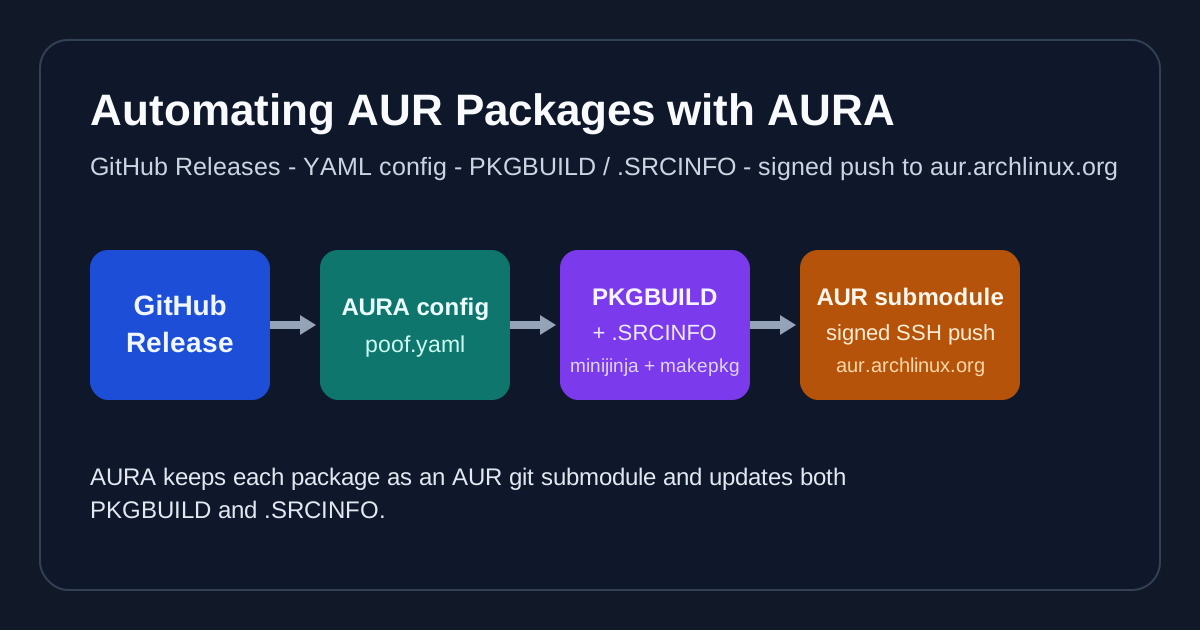
In part 1, I described the basic philosophy behind this series: a GitHub Release stays the source of truth, and packaging metadata is generated from it.
Arch Linux solves the same problem, but the packaging conventions are different enough that I keep the automation in a separate repository called AURA.
AURA stands for Arch User Repository Automation. Today it maintains two packages:
That -bin suffix is already a useful clue. Homebrew formulae and AUR packages may both be plain text, but they are not interchangeable packaging systems. Arch packaging expects different files, different metadata, different naming conventions, and a different publication path.
About the name
I wanted a name that was short, memorable, and evocative of Arch Linux. AURA is a good fit for multiple reasons:
- it is short and easy to type (I am lazy at the keyboard)
- it has AUR in it which is evocative of Arch Linux User Repository
- it is a real word in English, it means a distinctive atmosphere or quality that seems to surround and be generated by a person, place, or thing
- and… it’s also a little joke to my wife, with which I watched What’s Wrong with Secretary Kim, a K-Drama where a narcissistic boss repeats aura as a pun to his secretary Kim Mi-so (the Korean word for “aura” is “mi-so” (미소)).
Why AUR deserved its own repository
The easiest mistake would have been trying to reuse the Homebrew repository structure with a few conditionals.
That would have saved almost nothing.
A Homebrew tap emits Formula/*.rb files and commits them to GitHub. AURA emits PKGBUILD and .SRCINFO, pushes changes to an AUR repository over SSH, and also updates the parent repository so the submodule reference stays correct.
That is already enough to justify keeping the two systems apart.
Separating them also makes debugging much easier:
- if a Homebrew update fails, I look at
homebrew-tap - if an Arch package fails, I look at
aura
I do not have to untangle one workflow trying to pretend that Homebrew and AUR are the same thing.
What AURA actually manages
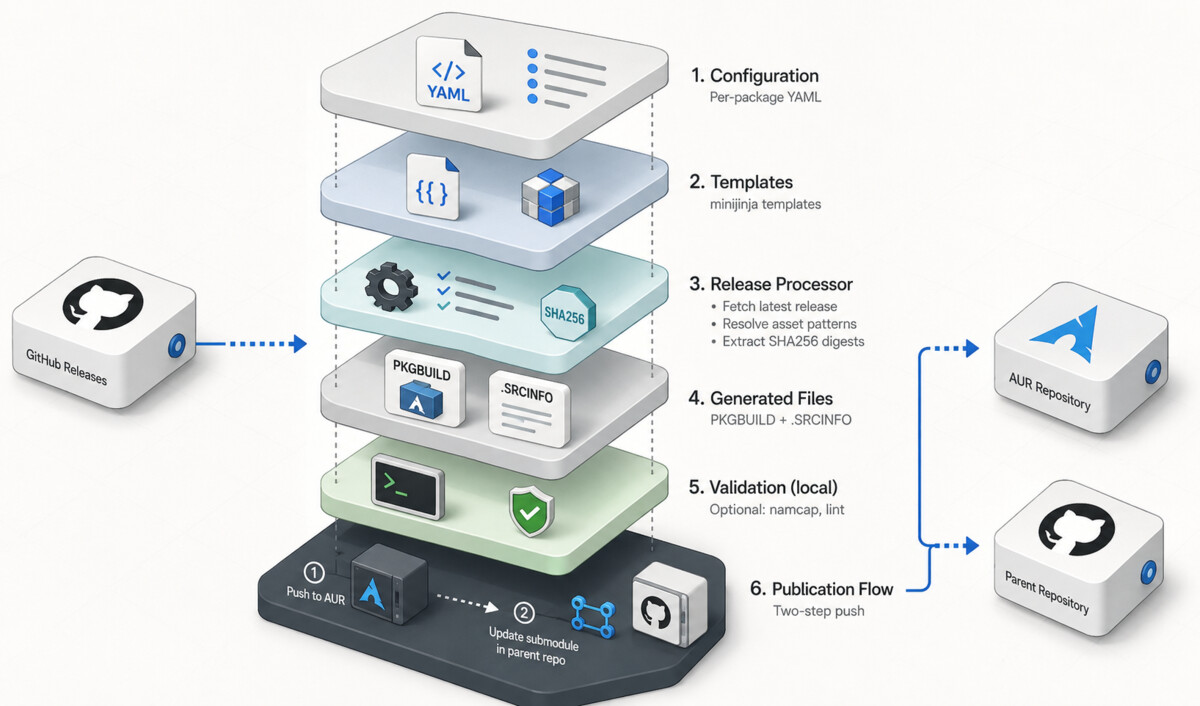
The repository keeps each AUR package as a git submodule:
| Submodule path | AUR repository URL |
|---|---|
| packages/poof-bin | ssh://aur@aur.archlinux.org/poof-bin.git |
| packages/vault-conductor-bin | ssh://aur@aur.archlinux.org/vault-conductor-bin.git |
That one decision shapes most of the repository:
- the package content lives where the AUR expects it
- the parent repository can version its own automation
- each package remains isolated
- an AUR push and a parent-repository update are clearly separate steps
This is one of the strongest differences from the Homebrew tap. The Homebrew repository owns its generated formulae directly. AURA coordinates with a second git remote for every package.
PKGBUILD is not a Formula
For Homebrew, my output file is Formula.rb. For Arch, the important output is usually PKGBUILD, plus the generated .SRCINFO.
That changes the shape of the metadata.
Here is the poof configuration used by AURA:
github_repo: "pirafrank/poof"
submodule_path: "packages/poof-bin"
template_path: "templates/pirafrank@poof.PKGBUILD.jinja"

asset_patterns:
  x86_64: "{NAME}-{VERSION}-x86_64-unknown-linux-gnu.tar.gz"
  aarch64: "{NAME}-{VERSION}-aarch64-unknown-linux-gnu.tar.gz"
  armv7h: "{NAME}-{VERSION}-armv7-unknown-linux-gnueabihf.tar.gz"
  riscv64: "{NAME}-{VERSION}-riscv64gc-unknown-linux-gnu.tar.gz"
The structure looks familiar if you read the Homebrew article. It is still configuration plus template. The difference is in what gets rendered and where it goes.
The template becomes a PKGBUILD like this:
pkgname=poof-bin
pkgver={{ version }}
pkgrel=1
pkgdesc="Magic manager of pre-built software (Prebuilt Binary)"
url="https://github.com/pirafrank/poof"
license=('MIT')
provides=('poof')
conflicts=('poof')

arch=('x86_64' 'aarch64' 'armv7h' 'riscv64')

source_x86_64=("${url}/releases/download/v${pkgver}/poof-${pkgver}-x86_64-unknown-linux-gnu.tar.gz")
sha256sums_x86_64=('{{ x86_64_sha256 }}')
The generated .SRCINFO then mirrors that metadata in the format expected by AUR tooling.
This is one reason I did not try to reuse the Homebrew automation directly. The output is not just a different template. It is a different file model.
Why not reuse the Homebrew automation
At a high level, both repositories consume GitHub Releases. That is where the similarity ends.
Here are the differences that matter in practice:
1. Different outputs
Homebrew generates one formula file in Formula/.
AURA generates:
PKGBUILD.SRCINFO
The .SRCINFO step matters because it is not hand-written. The script renders PKGBUILD first, then runs:
makepkg --printsrcinfo
to generate the machine-readable metadata.
2. Different architecture conventions
The Homebrew tap uses keys such as macos_intel and linux_arm.
AURA uses Arch naming, such as:
x86_64aarch64armv7hriscv64
There is even a small translation embedded in the repository: upstream armv7 release assets map to Arch armv7h.
3. Different publication path
Homebrew stops at a signed commit in a normal GitHub repository.
AURA performs two pushes when something changes:
- push updated
PKGBUILDand.SRCINFOto the AUR submodule remote - commit and push the updated submodule pointer to the parent
aurarepository
That alone would have made a shared workflow awkward.
4. Different trust model
The Homebrew tap uses a GitHub Action to create a signed commit in one repository.
AUR pushes happen over SSH to the AUR-hosted repository. In my CI workflow, I also sign commits, so I turned to vault-conductor to manage both signing and SSH authentication. With it the workflow can:
- sign the commit with the SSH signing key
- authenticate the push to
aur.archlinux.org
That is a much more specific workflow than “render a file and commit it” over GitHub GraphQL APIs.
The generator is still intentionally small
As in the Homebrew repository, scripts/update.py is short and direct.
It does four important things:
- load a YAML configuration
- fetch
/releases/latestfrom GitHub - resolve asset patterns and extract SHA256 values from the asset
digestfield - render
PKGBUILDand generate.SRCINFO
The same “release as source of truth” idea is still intact.
That means AURA gets the same benefits as the tap:
- no manual checksum copying
- no hand-edited version bumps
- predictable asset contract
- small amount of Python
The implementation also uses minijinja, just like the Homebrew repository. So while the packaging conventions differ, the automation style stays familiar: configuration plus Jinja-compatible templates.
What the GitHub Action actually does
The workflow entry points are:
-
workflow_dispatchwithproject_name -
repository_dispatchwith event typeupdate_aur_package
From there, the flow is more interesting than in the tap:
- check out the parent repository without submodules
- install
pacman-package-manager - start
vault-conductor - configure Git for SSH commit signing
- add
aur.archlinux.orgto known hosts - clone the AUR submodules over SSH
- run
python scripts/update.py <project_name> - detect changes in the submodule
- if needed, commit and push to AUR
master - commit and push the updated submodule pointer to the parent
main
That dual push is one of the most valuable details in the repository. It is also the kind of detail that tends to disappear when people describe automation only at the “there is a GitHub Action” level.
Manual bootstrap still matters
The repository cannot create an AUR package out of thin air.
The README is explicit about that: if I want to add a new package, I first need to manually create the AUR repository because that is how the AUR workflow works. Only after that can I:
- add the AUR repository as a submodule
- write the configuration in
configurations/ - add the matching template in
templates/ - push the automation changes
That is another difference from Homebrew. The tap can generate a new formula file entirely within GitHub. AURA still depends on an external repository that must already exist.
Generation is automated, validation is only partly automated
This is the place where I want to be very literal about what the repository does.
The CI workflow:
- regenerates
PKGBUILD - regenerates
.SRCINFO - signs commits
- pushes updates to AUR and GitHub
The CI workflow does not:
- build the Arch package
- run
namcap - run a test suite
That is not a criticism of the repository. It is just important to say what is true.
Local validation is still possible and documented:
cd scripts
source .venv/bin/activate
python3 update.py poof

cd ../packages/poof-bin
namcap PKGBUILD
That is enough for this repository’s scope, because AURA is focused on keeping package definitions synchronized with releases, not on becoming a full Arch build farm.
A small comparison with the Homebrew tap
Here is the shortest practical comparison between the two repositories:
| Topic | Homebrew tap | AURA |
|---|---|---|
| Output | Formula/*.rb | PKGBUILD + .SRCINFO |
| Template engine | minijinja | minijinja |
| Repository layout | normal GitHub repo | GitHub repo + AUR submodules |
| Publication target | GitHub repository | aur.archlinux.org plus parent repo |
| Commit flow | one commit | two signed commits/pushes |
| Extra generation step | none | makepkg --printsrcinfo |
This is why I keep them separate. They solve a similar release-consumption problem, but they do not operate in the same environment.
Wrap-up
I made AURA work for me because by respecting Arch packaging instead of trying to hide it: it keeps AUR repositories as submodules, uses a small config-and-template model, generates .SRCINFO automatically, and lets GitHub Actions perform the repetitive part while still preserving the publication model the AUR expects.
That makes it a good second step after Homebrew. The release-driven philosophy is the same, but the conventions are different enough to justify their own repository, workflow, and debugging surface.
The final article in the series will go one step further: it will cover building and publishing tools for Debian-like, RPM-based, and Alpine systems, where a package file is only part of the problem. You also need repository indexes, signatures, storage, and a serving path users can actually add to their systems.
I hope it helps. Thanks for reading.