
Automating Homebrew Formula updates from GitHub Releases
- Automating Homebrew Formula updates from GitHub Releases
- Automating AUR Packages with AURA and GitHub Actions
- Automate your own APT, YUM/DNF, and APK repositories using GitHub Actions, Cloudflare R2, and a Worker
- What I did
- Why start with Homebrew
- Why use a dedicated tap
- What the repository actually contains
- One YAML file per tool
- Templates stay close to the final formula
- GitHub Releases as the source of truth
- Updating the formula locally
- GitHub Actions handles the routine case
- Failure modes stay predictable
- Wrap-up
When publishing CLI tools, building the binary is usually the easy part. The harder part starts after the release is already out. Users want to install software with the package manager they already trust, not with a shell snippet they pasted from a README six months ago and forgot about.
Once you support more than one platform, manual packaging work starts repeating in a very predictable way:
- Homebrew needs a formula
- Arch users expect a
PKGBUILD - Debian and Ubuntu users want an APT repository
- Fedora, RHEL, CentOS, and Amazon Linux users want a YUM or DNF repository
- Alpine users expect APK packages
I ran into this when I wanted to distribute poof and vault-conductor through the package managers users already have. I mostly develop CLI tools, with Rust being my language of choice. It has been like that for quite some time. That means I can cross-compile binaries for Linux and macOS from a single CI job, and I can produce a GitHub Release with all the assets I need.
It was already two tools with a similar release flow, and I knew I would have more to add in the future (my projects shelf already has some drafts). So, I did not want to manually repeat the same packaging work for each new release of the tools.
“When you try to solve a problem, you should not create a new one.”
What I did
After looking at the distributions and package managers I wanted to support, I decided that, besides version managers like asdf, the tools should be first-class citizens on macOS and on Linux. The goal was to meet users where they already are, with tools they know and use.
I split the problem into three repositories:
This article is about the first one: Homebrew.
The main idea behind all three repositories is the same. A GitHub Release remains the source of truth, and the package manager metadata is generated from it and automatically committed via a GitHub Actions workflow. That keeps the packaging side small, repeatable, and easy to debug when something goes wrong.
As a side note, Homebrew is only available on a limited set of platforms (namely ARM64/AArch64 and Intel x86_64 with SSSE3 support), and I wanted to make my tools available on as many as possible, that’s why I have built poof. But that’s a story for another post.
Why start with Homebrew
Homebrew is the broadest entry point in this setup.
It is the package manager most people around me already use on macOS, and it also covers a smaller but still useful Linux audience through Linuxbrew. More importantly, a Homebrew formula is just a Ruby file. That makes it a nice place to start the series because the automation is easy to inspect: fetch release metadata, fill a template, commit the updated formula.
The user-facing flow stays simple as usual:
brew tap pirafrank/tap
brew install pirafrank/tap/poof
This is for example to install poof. Exactly the outcome I want. The interesting work should happen before the user ever runs the install command.
Why use a dedicated tap
There are tools that try to publish to many package managers from one configuration file. Sometimes that is the right trade-off.
For my own tools, I prefer the packaging repositories to stay close to the package manager they serve. The Homebrew repository looks like a normal tap. It does not build binaries. It does not try to understand AUR conventions. It does not manage repository metadata for Debian or RPM systems.
It has one job: translate release metadata into Formula/*.rb files.
That narrow scope gives me a few advantages:
- the tap is small enough to understand quickly
- failures have a small blast radius
- formula generation can follow Homebrew conventions directly
- I can change the Homebrew pipeline without touching Arch or Linux repository publishing
The trade-off is maintaining more than one repository. For me that is fine, because each one stays boring in a useful way.
What the repository actually contains
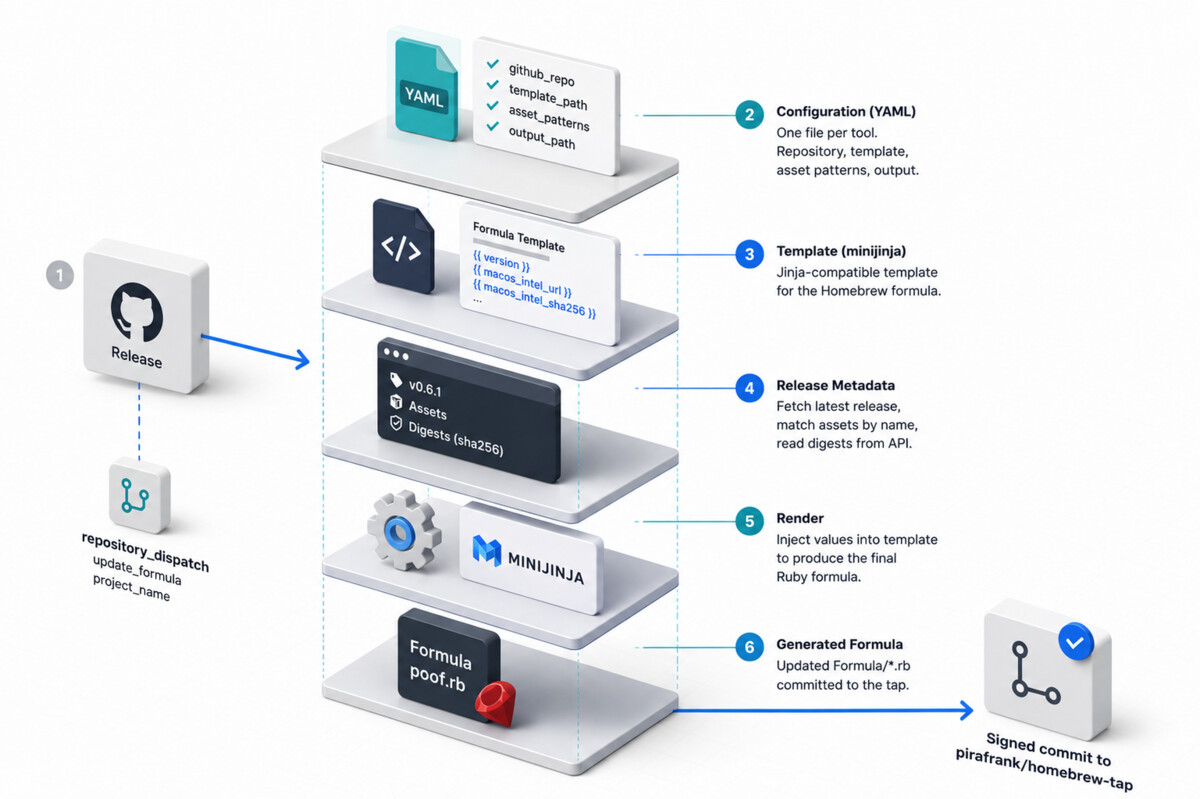
The tap repository has three main ingredients:
-
configurations/for YAML files, one per project -
templates/for Jinja-compatible formula templates -
Formula/for the generated Homebrew formulae
The generator itself lives in scripts/update_formula.py. It is a short Python script that fetches the latest release from GitHub, resolves the assets it needs, extracts SHA256 digests from the API response, renders the template with minijinja, and writes the final Ruby file.
That design matters. Instead of hardcoding every formula inside a Python script, the script only knows how to:
- load a project configuration
- fetch release metadata
- match the expected assets
- render the formula
Everything project-specific is kept in configuration and templates.
One YAML file per tool
The metadata configuration used for poof follows. It contains naming conventions of assets for x86_64 and arm64 variants which cover the CPU architectures best supported by Homebrew on Linux and macOS.
github_repo: "pirafrank/poof"
template_path: "templates/pirafrank@poof.rb.jinja"
output_path: "Formula/poof.rb"

asset_patterns:
  macos_intel: "{NAME}-{VERSION}-x86_64-apple-darwin.tar.gz"
  macos_arm: "{NAME}-{VERSION}-aarch64-apple-darwin.tar.gz"
  linux_intel: "{NAME}-{VERSION}-x86_64-unknown-linux-gnu.tar.gz"
  linux_arm: "{NAME}-{VERSION}-aarch64-unknown-linux-gnu.tar.gz"
That file is enough to describe the release interface the tap expects:
- which GitHub repository to watch
- which template to render
- where the output formula should be written
- which release assets should exist for each supported platform and architecture
The two placeholders are simple but enough:
-
{NAME}becomes the upstream project name, such aspoof -
{VERSION}becomes the latest release version, such as0.6.2
This is also where predictable asset naming starts paying off. If your release assets keep changing shape between versions, automation quickly becomes fragile. If the names stay structured, the packaging code can stay small.
That is one reason I care so much about cross-platform release naming. I wrote about that part a couple of posts ago.
Templates stay close to the final formula
The template for poof is intentionally close to the generated Ruby:
class Poof < Formula
  desc "Magic manager of pre-built software. Install and manage awesome tools from GitHub Releases in one command."
  homepage "https://github.com/pirafrank/poof"
  license "MIT"
  version "{{ version }}"

  on_macos do
    on_intel do
      url "{{ macos_intel_url }}"
      sha256 "{{ macos_intel_sha256 }}"
    end
    on_arm do
      url "{{ macos_arm_url }}"
      sha256 "{{ macos_arm_sha256 }}"
    end
  end

  on_linux do
    on_intel do
      url "{{ linux_intel_url }}"
      sha256 "{{ linux_intel_sha256 }}"
    end
    on_arm do
      url "{{ linux_arm_url }}"
      sha256 "{{ linux_arm_sha256 }}"
    end
  end
end
I like this pattern because the output remains easy to inspect for a human. The template is not doing clever metaprogramming. It is mostly a normal formula with a few injected values.
That makes debugging easier too. If a release asset is wrong, I can look at the generated formula and immediately see the exact URL and checksum Homebrew will use.
GitHub Releases as the source of truth
The core of the script is very direct:
- fetch
/releases/latest - read
tag_name - strip the
vprefix to get the version - resolve the configured asset names
- look up matching assets by exact filename
- read each asset’s
digestfield - extract the
sha256:hash - render the formula
There are two details here that I particularly like.
The first is exact asset matching. The script does not do fuzzy guessing. If it expects poof-0.6.2-x86_64-apple-darwin.tar.gz and that asset is missing, it fails loudly. That is much better than silently generating a broken formula.
The second is checksum handling. The script does not compute hashes from my laptop. It reads the digest directly from the GitHub release asset metadata. If CI built the binary, CI should also be the place that produces the digest consumed by packaging automation.
That makes the release pipeline much easier to reason about. The build job owns the artifact and its digest. The packaging job only consumes them.
Updating the formula locally
The local update flow is intentionally routine:
python scripts/update_formula.py poof
Before that, I only need the small Python environment used by the repository:
python -m venv scripts/.venv
source scripts/.venv/bin/activate
pip install --upgrade pip
pip install -r scripts/requirements.txt
There is no elaborate framework here. The dependencies are simply:
requestsPyYAMLminijinja
That last detail is worth calling out because the syntax is Jinja-like, but the implementation is minijinja, not Jinja2.
GitHub Actions handles the routine case
The repository workflow supports two entry points:
-
workflow_dispatchwhen I want to run it manually -
repository_dispatchwhen another repository asks the tap to update a specific formula
In both cases, the input eventually becomes one value: project_name.
That means the release flow is small and explicit:
- a tool repository publishes a GitHub Release
- it dispatches
update_formulawithclient_payload.project_name - the tap workflow runs
python scripts/update_formula.py <project> - if the formula changed, the workflow commits it
The commit step is also intentionally conservative. The workflow checks for diffs first. If nothing changed, there is nothing to commit. If something changed, the workflow creates a signed commit with github-commit-sign action.
That signing step matters because packaging metadata is part of the trust story. Users are not only trusting the binary they install, they are also trusting the path that points them to it. I wrote a separate post about commit and tag signing in Git.
Failure modes stay predictable
The script fails loudly in the cases I actually care about:
- missing configuration file
- invalid YAML
- missing required configuration keys
- missing template
- GitHub API failure
- expected release asset not found
- asset digest missing or malformed
That may sound obvious, but it is part of the design. Packaging automation should not be “smart” in surprising ways. If the release is missing an asset or its digest, I want the pipeline to stop immediately.
One small edge case in the repository is exif_renamer: its configuration name and upstream repository name differ, because the source repository is rust_exif_renamer. That is exactly the kind of mismatch that becomes manageable when everything is expressed through configuration instead of naming assumptions hidden in the script.
Wrap-up
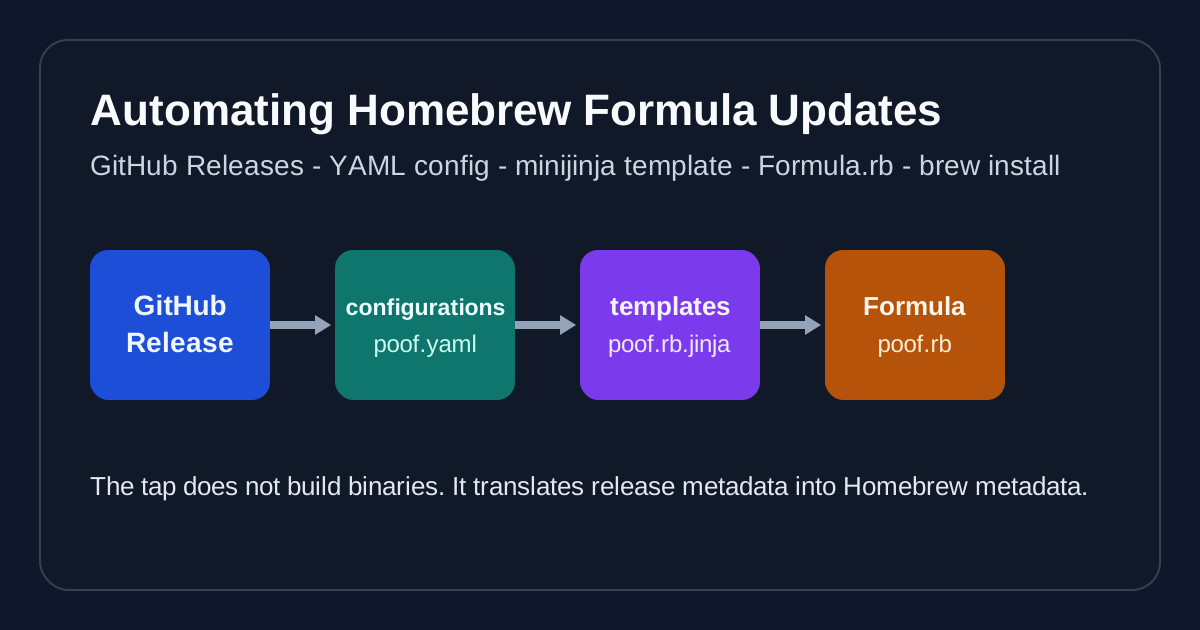
The Homebrew tap works well because it stays small. It does not compile the software. It does not build repository indexes. It does not try to push to AUR. It only consumes release metadata and emits Homebrew metadata.
That is also why this article is the first part of the series. It introduces the shared philosophy in the simplest environment:
- a GitHub Release is the source of truth
- packaging metadata should be generated
- each packaging channel deserves its own repository when conventions diverge
In the next article, I will look at AURA. Arch packaging solves the same problem, but its conventions are different enough that I keep it completely separate.
I hope it helps. Thanks for reading.