
Automate your own APT, YUM/DNF, and APK repositories using GitHub Actions, Cloudflare R2, and a Worker
- Automating Homebrew Formula updates from GitHub Releases
- Automating AUR Packages with AURA and GitHub Actions
- Automate your own APT, YUM/DNF, and APK repositories using GitHub Actions, Cloudflare R2, and a Worker
- Package files are not package repositories
- The source repository vs the public endpoint
- The common release contract
- One dispatch, three workflows
- APT: package files plus repository metadata
- YUM and DNF: one binary, several repository layouts
- APK is the most different path
- Trust and signing are different here
- Storage and serving: R2 plus a Worker
- Verification exists, but it is not release-gating
- Why I still prefer three repositories
- Wrap-up
The first two parts of this series were about generating package-manager metadata from GitHub Releases. Each of those repositories had a single responsibility:
- Homebrew needs a formula,
- AUR needs
PKGBUILDand.SRCINFOfiles.
For Debian-like, RPM-based, and Alpine systems, that is not enough.
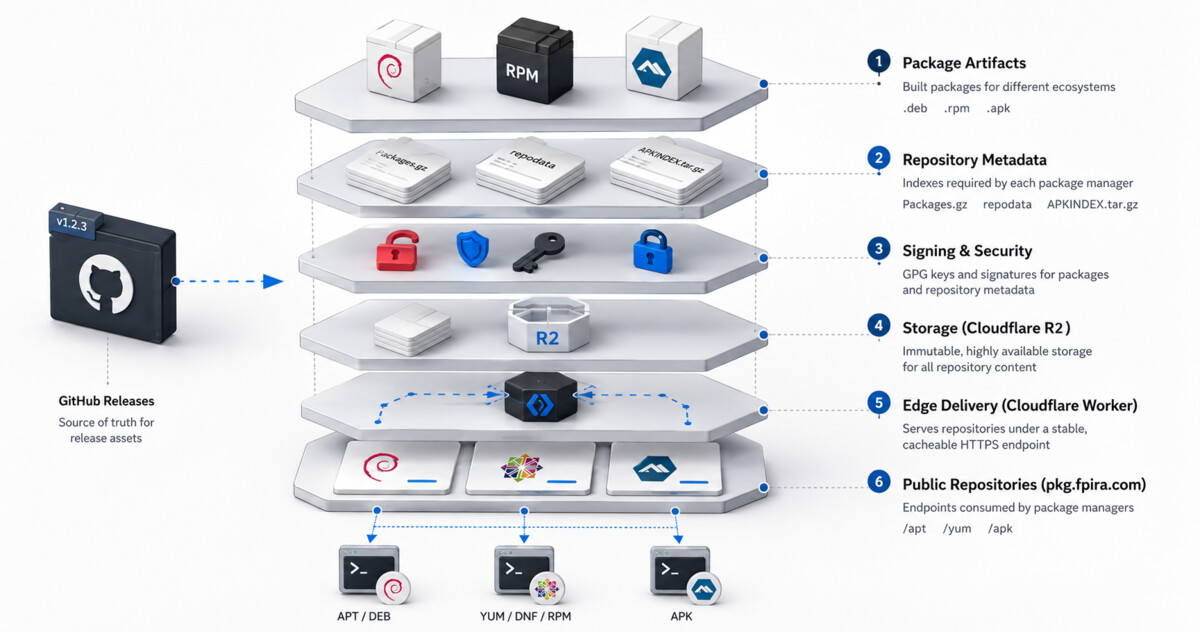
Those ecosystems usually expect a full repository on their own terms, not just a single package file. That means the release process needs to handle more than package generation. It should also provide:
- package metadata
- repository indexes
- signatures
- storage
- a stable HTTP endpoint that package managers can use
That is what the third repository in this series does.
The source repository is pirafrank/packages. The public endpoint users actually interact with is pkg.fpira.com.
That distinction matters, so I will keep repeating it:
-
packagesis the source repository -
pkg.fpira.comis the published package endpoint
Package files are not package repositories
If I only build a .deb, .rpm, or .apk, I have solved only one part of the problem.
A repository-aware installation flow needs more:
- the package file itself
- the metadata that indexes it
- signing keys and signatures
- a location clients can add to their package-manager configuration
- a structure that supports upgrades later
That is why this repository is the most complex of the three. It is not only translating release metadata. It is also publishing an ecosystem-specific delivery channel.
The user-facing result is still boring, which is exactly the point.
On Debian and Ubuntu:
curl -fsSL https://pkg.fpira.com/apt/gpg.pub \
  | sudo gpg --dearmor -o /usr/share/keyrings/pkg.fpira.com.gpg
echo "deb [signed-by=/usr/share/keyrings/pkg.fpira.com.gpg] https://pkg.fpira.com/apt stable main" \
  | sudo tee /etc/apt/sources.list.d/pkg.fpira.com.list
sudo apt update && sudo apt install poof
On Fedora, RHEL, or CentOS:
sudo rpm --import https://pkg.fpira.com/yum/gpg.pub
sudo tee /etc/yum.repos.d/pirafrank.repo << EOF
[pirafrank]
name=pirafrank
baseurl=https://pkg.fpira.com/yum/el9/$(uname -m)/
enabled=1
gpgcheck=1
gpgkey=https://pkg.fpira.com/yum/gpg.pub
EOF
sudo dnf install poof
On Alpine:
wget -q -O /etc/apk/keys/signing-key.rsa.pub \
  https://pkg.fpira.com/apk/signing-key.rsa.pub
ALPINE_VERSION=$(cat /etc/alpine-release | cut -d. -f1,2)
echo "https://pkg.fpira.com/apk/v${ALPINE_VERSION}" \
  >> /etc/apk/repositories
apk update && apk add poof
Once that setup exists, upgrades become native too:
sudo apt update && sudo apt upgrade
sudo dnf upgrade
apk upgrade
That is the end-user experience I care about.
The source repository vs the public endpoint
The repository called packages is where the automation lives:
- GitHub Actions workflows
- application configuration
- architecture matrices
- packaging scripts
- signing steps
- R2 publishing
- the Cloudflare Worker used to serve the final files.
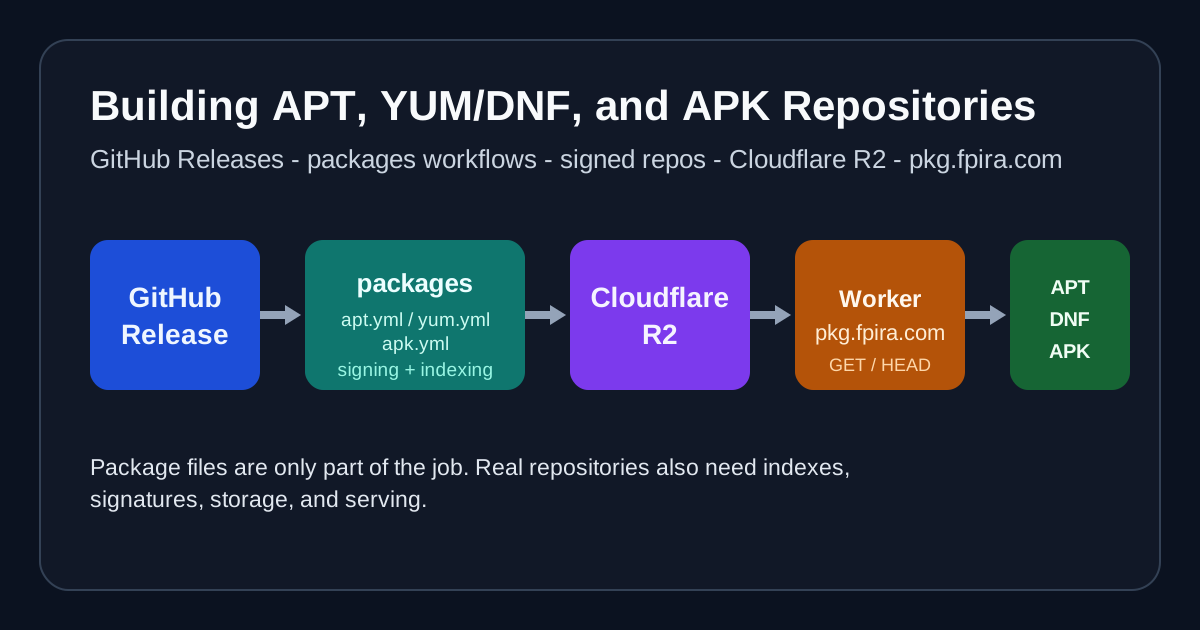
That separation is useful because it reflects the actual architecture:
- a tool repository publishes a GitHub Release
-
packagesconsumes the release assets - GitHub Actions builds packages and repository metadata
- the results are uploaded to a Cloudflare R2 bucket
- a Cloudflare Worker serves the repository under
pkg.fpira.com
So the repository name and the public name represent two different layers, not two names for the same thing.
The public domain pkg.fpira.com is the final product of that automation. I have also added a public facing webpage at the root of that domain so users can see the available repositories and the commands to add them to their systems.
The common release contract
All three packaging repositories in this series consume upstream GitHub Releases, but the packages repository is deliberately more mechanical about it.
Each workflow accepts the same two pieces of input:
app_nametag
Those values arrive either from workflow_dispatch or from a repository_dispatch event named new_release.
The workflows then strip the v prefix from the tag and use the app name to load:
- application metadata from
configurations/*.jsonc - target matrices from
matrices/{apt,yum,apk}/*.matrix.jsonc
For poof, the base metadata is tiny:
{
  "source_repo": "pirafrank/poof",
  "maintainer": "Francesco Pira <dev@fpira.com>",
  "description": "Easy to use zero-config, zero-install, zero-dependencies manager of pre-built software that works like magic",
  "url": "https://github.com/pirafrank/poof",
  "category": "utils",
  "license": "MIT"
}
The real variability lives in the matrices.
For example, the APT matrix for poof includes:
amd64arm64armhfi386riscv64
with a per-target glibc_max constraint.
By contrast, vault-conductor only has two APT targets:
amd64arm64
That is one reason I like the repository structure. The metadata for an app stays separate from the set of targets it supports in each ecosystem.
One dispatch, three workflows
The repository is split into three publishing workflows:
apt.ymlyum.ymlapk.yml
That makes the repository easier to reason about than one giant workflow file trying to do everything in one place.
It also matches the actual work better:
- APT and YUM both use
fpm, but publish very different metadata - APK has a completely different build and signing path
- each repository family has its own storage layout
All three workflows also enforce the same integrity step before packaging: download a predictable release asset and verify it against the upstream SHA256 digest exposed by GitHub Releases.
Each workflow listens to the same new_release event, but they keep their own concurrency group:
apt-publishyum-publishapk-publish
so only one run per pipeline group proceeds at a time, with additional being queued. However, their matrix jobs can still run in parallel within a single workflow run, which is important to speed up the operations for multi-architecture packages.
APT: package files plus repository metadata
The APT workflow is a good example of how the repository is designed.
It starts by resolving inputs and loading:
- the app config JSONC
- the app-specific APT matrix
Then, for each matrix entry, it:
- downloads the matching GitHub release asset with
gh release download - fetches the expected SHA256 digest for that exact asset from release metadata
- verifies the downloaded tarball with
sha256sum -c - extracts the binary from the tarball
- runs a glibc compatibility check with the root
justfile - builds a
.debpackage usingfpm - uploads the built package as an artifact
The glibc check is an important boundary. The repository uses:
just glibc binary/<app>
to inspect the highest glibc version required by the binary and compare it against the configured ceiling for that target. This keeps the published packages aligned with the older distributions the repository still wants to support.
After the .deb files are built, the publish job:
- downloads the existing APT repository from R2
- installs
reprepro - imports the GPG signing key
- initializes or reuses
apt/conf/distributions - adds any new
.debpackages to the repository - exports the public GPG key
- syncs the updated repository back to R2
One detail I particularly like is that the repository uses the multiple-versions-debian branch of reprepro, and the generated distributions config sets:
Limit: 0
In other words, the repository does not pretend the APT side is a one-version-at-a-time bucket. It behaves like an actual package repository.
The publish step is also idempotent. Before adding a .deb, it checks whether that version is already registered and skips includedeb if it is. That cut the risks of accidental overwrites during re-runs.
YUM and DNF: one binary, several repository layouts
The YUM workflow starts a lot like the APT one:
- resolve inputs
- load config and matrix
- download release assets
- verify each asset against its GitHub-published SHA256 digest
- extract binaries
- enforce glibc compatibility
It also uses fpm, but this time to build RPM packages.
The interesting part is that each binary is repackaged four times, one for each distribution family layout:
el8el9amzn2amzn2023
That means one upstream x86_64-unknown-linux-gnu build can become several repository-specific RPM filenames, each published in the appropriate directory.
After building the RPMs, the publish job:
- imports the GPG key
- configures RPM signing macros
- downloads the existing YUM repository from R2
- signs the RPMs with
rpm --addsign - organizes them into distribution and architecture directories
- runs
createrepo_c - signs each
repomd.xml - exports the public GPG key
- syncs everything back to R2
This is where building package files and hosting repositories become separate concerns: the RPM build itself is not the hardest part, the repository metadata and signing path are what turn the output into something DNF or YUM can actually trust and use.
APK is the most different path
APK is the least similar to the Homebrew and AUR articles, which makes it the clearest example of why this repository needs its own shape.
The APK workflow still begins from the same release inputs, but it diverges quickly:
- it targets
*-unknown-linux-muslbinaries - it uses a Docker-based Alpine build environment
- it relies on
APKBUILD.template - it signs the repository with an RSA key used by Alpine tooling
The matrix is also two-dimensional in a way the others are not. For poof, the APK flow builds across:
x86_64aarch64armv7riscv64
and repeats that for Alpine:
3.203.213.223.23
That is a lot of combinations, but the matrix keeps it explicit.
The build job:
- downloads the release asset for one musl target
- fetches the expected SHA256 digest for that exact asset from release metadata
- verifies the downloaded tarball with
sha256sum -c - extracts the binary
- installs
poofand Bitwarden’sbwsCLI - retrieves the APK signing key from Bitwarden Secrets Manager
- converts the key material into the format expected by Alpine tooling
- builds a Docker image for the target Alpine version
- runs the container to generate the
.apk
The template used inside that container is tiny:
pkgname=@@PKGNAME@@
pkgver=@@PKGVER@@
pkgrel=@@PKGREL@@
pkgdesc="@@PKGDESC@@"
url="@@URL@@"
arch="@@ARCH@@"
license="@@LICENSE@@"

package() {
    install -Dm755 /input/@@PKGNAME@@ "$pkgdir/usr/bin/@@PKGNAME@@"
}
This is much simpler than handling combinations as part of the template itself, and it better matches how the responsibilities are split between the repository and the workflow. The template only needs to describe the package. The workflow handles the repository side.
The publish job then:
- downloads the existing APK repository from R2
- copies packages into
v<alpine-version>/<arch>/ - retrieves the signing key again
- creates
APKINDEX.tar.gzfor each populated directory - signs each index with
abuild-sign - exports the public key as
signing-key.rsa.pub - syncs the repository back to R2
That publishing step is the strongest reason this repository needs its own article.
Trust and signing are different here
This repository has a different trust model from the other two in the series, althought it shares the same checksum-verification baseline.
In the Homebrew tap, trust included formula updates plus SHA256 digests for release assets.
In AURA, trust included SSH-signed commits, publication to aur.archlinux.org, and digest verification in the packaging flow.
Here, trust layers those same digest checks with signed repository metadata and published keys:
- downloaded assets are validated against GitHub-published SHA256 digests before packaging
- APT metadata is signed through GPG and
reprepro - RPM packages are signed, and
repomd.xmlis detached-signed - APK uses an RSA signing key for
abuild-sign
The repository also uses two secret-management styles:
- GPG secrets for APT and YUM
- Bitwarden Secrets Manager for the APK signing key
That is another reason I did not want to hide all packaging paths behind one generic abstraction. The trust model changes across ecosystems too.
Storage and serving: R2 plus a Worker
All three package families are stored in Cloudflare R2.
That means the GitHub Actions workflows do not commit built artifacts back into the repository. They publish mutable repository state to object storage instead.
Then the Cloudflare Worker serves that state under pkg.fpira.com.
The Worker logic is refreshingly small:
- only
GETandHEADare allowed -
/servesindex.html - missing objects return
404 - APK “stable” requests are redirected to the latest supported Alpine version
The last point is particularly useful:
/apk/stable/...
is rewritten to the current stable Alpine path, which is hardcoded in the Worker so clients can have a simpler target when that shortcut makes sense.
The root page is also generated from the repository README and uploaded to R2, so the landing page users see at pkg.fpira.com is part of the same publishing model.
Verification exists, but it is not release-gating
The repository includes:
test_apt.ymltest_yum.ymltest_apk.yml
Those workflows build Docker images and install packages from the live repository endpoint. That is useful because it verifies the actual consumer experience, not only the packaging commands in isolation.
They are manual workflow_dispatch workflows right now, not release-gating tests automatically triggered on each publish. That distinction is worth saying out loud for the same reason it mattered in the AURA article: automation names and descriptions are more useful when they describe what really happens.
Not making the tests a gate is a choice: it would be nice, but it would add complexity. Not to mention that to test the package it must be already published, defeating the purpose of a gate.
Why I still prefer three repositories
By the time I reach this part of the series, the answer is hopefully clearer than in the abstract.
| Repository | Purpose |
|---|---|
homebrew-tap | Generate Homebrew formulae |
aura | Generate AUR package definitions |
packages | Build, sign, publish, and serve Linux repositories |
Trying to merge those three responsibilities into one release repository would save some duplication, but it would also blur a lot of important differences:
- file formats
- repository layout
- signing model
- publication path
- failure modes
I would rather maintain three smaller systems with clear jobs than one larger system that tries to pretend those jobs are identical.
Wrap-up
This repository is the most operationally heavy part of my packaging setup, but it also gives the nicest end-user result.
Instead of telling users to fetch standalone package files by hand, I can give them repository instructions that integrate with the package manager they already use. That means native install commands, native upgrades, signed metadata, and a predictable endpoint at pkg.fpira.com, which will easily serve the other tools I will publish in the future.
That is the shape I wanted my release workflow to have: one release source, three packaging channels, and repositories that stay close to the ecosystems they serve.
I hope it helps. Thanks for reading.